Video Downloader
for Windows. WarpFetch.
Save and organize video, audio and available subtitles in one desktop workflow.
Built-in browser, playlists and audio-only downloads. Subtitle tools for eligible YouTube videos.
Free edition · Windows 10/11 · macOS coming soon
Official download · See our privacy policy
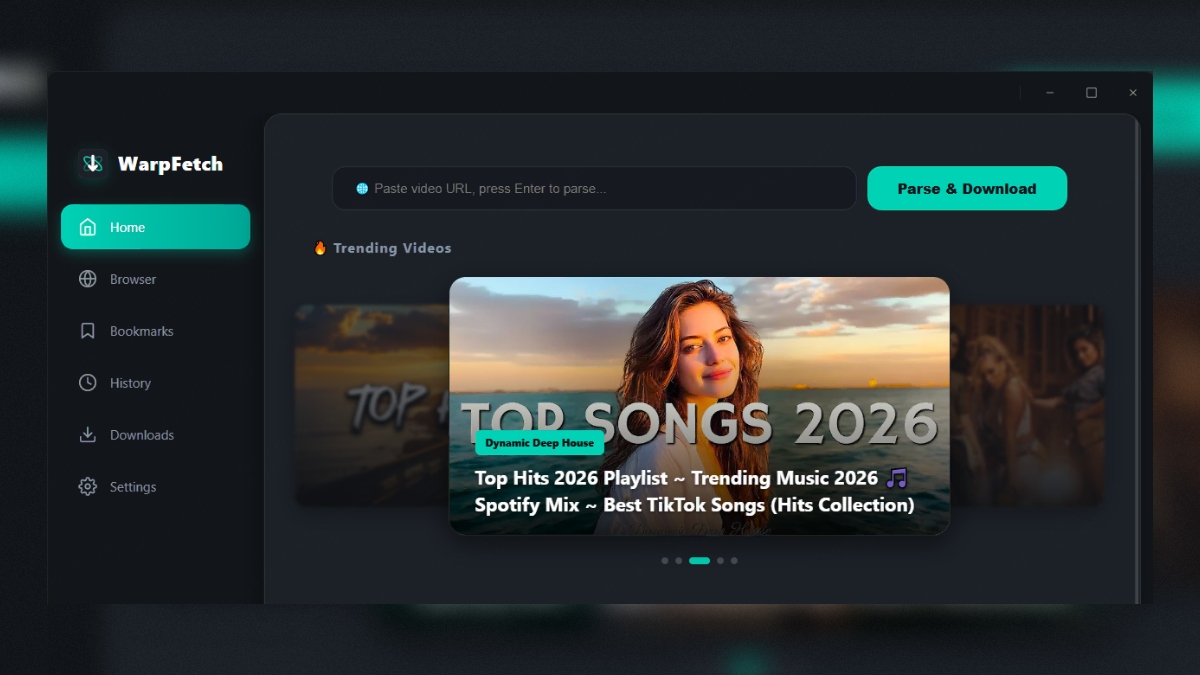
Explore your media workflow
Beautiful, Powerful,
Intuitive.
Every detail is designed for the best archival experience. Click to explore.
Home — Trending Content & Quick Platform Access
Home Built-in Browser
 Smart Parsing
 Tasks Manager
 Media Preview
 Audio Player
 Bookmarks
 History
 Playlist Detection
 Settings
Everything You Need,
Nothing You Don't.
WarpFetch combines a powerful fetching engine with an elegant interface — designed for speed, built for simplicity.
Manage Download Tasks
Follow download progress and organize your queue. Available quality and completion depend on the source and your connection.
Built-in Smart Browser
Browse supported media platforms with multi-tab support. One click to parse and fetch — no URL copying needed.
Playlists, Batch & Subtitles
Select playlist items for batch downloads. For eligible YouTube video tasks, save available subtitles as VTT; Pro adds burn-in. Free playlist presets go up to 720p.
Pure Audio Extraction
Choose audio-only output from a parsed online source. Available audio depends on the source; this is not a general local-file converter.
Smart Media Manager
Bookmarks with thumbnail previews, browsing history with search, and a powerful tasks panel with pause, resume & retry.
11 Languages Supported
English, 简体中文, 繁體中文, 日本語, Русский, Español, Português, Deutsch, Français, ไทย, 한국어.
Get more from your downloads
Understand subtitle files, check your installer, and find help before your next download.
Simple, Transparent Pricing
Start free. Upgrade for more parallel downloads, full playlists, and Pro subtitle tools.
- ✓ 5 media fetches / day
- ✓ 5 audio extractions / day
- ✓ Daily playlist allowance: 1
- ✓ Up to 2 concurrent downloads
- ✓ Playlist batch up to 3 videos
- ✓ Eligible YouTube VTT · playlist up to 720p
- ✓ Built-in browser & custom proxy setting
- ✓ 11 languages · auto updates
- ✓ Everything in Free
- ✓ Unlimited daily fetches (no quota)
- ✓ Up to 10 concurrent downloads
- ✓ Unlimited playlist batch size
- ✓ Burn-in subtitles · playlist best / 1080p
- ✓ Priority tech support
- ✓ 1 device activation
- ✓ Everything in 1-Year License
- ✓ Lifetime free updates forever
- ✓ Advanced smart parsing technology
- ✓ Ask support about multi-device activation
- ✓ Up to 10 concurrent downloads
- ✓ Burn-in subtitles · playlist best / 1080p
- ✓ Max-speed processing engine
- ✓ Priority feature requests
Frequently Asked Questions
Is WarpFetch completely free?
Yes. Free Edition stays free with daily limits (5 media, 5 audio, 1 playlist), up to 2 concurrent downloads, and playlist batches of up to 3 videos. Upgrade to Pro for unlimited daily fetches, up to 10 parallel downloads, full playlist batches, eligible YouTube subtitle burn-in, and playlist best/1080p.
What is the difference between 1-Year and Lifetime?
The 1-Year License lasts 12 months on one device. Lifetime Pro is a one-time license. Review the pricing page and checkout conditions before purchasing.
Can I use one license on multiple computers?
The annual license lists one device. Contact support to confirm the precise Lifetime device allowance and any transfer conditions before buying.
Do you support Mac or Linux?
The Windows installer is available. macOS and Linux installers are not currently available from this website.
What if an online source updates its structure and fetching fails?
Platform changes can affect downloads. Check the source and send support your app version, task type and error message.
What are the system requirements?
The current release targets Windows 10/11. Check the official download page for available installers and contact support about compatibility.
Why does Windows SmartScreen or my antivirus flag the installer?
Keep Windows security checks enabled. Check the official source, publisher and exact warning before running an installer. Contact support if you cannot verify the file.
What are the Free vs Pro limits?
Free: daily quotas, ≤2 concurrent downloads, ≤3 videos per playlist batch, eligible YouTube subtitle extract (.vtt), playlist quality up to 720p. Pro: no daily quota, ≤10 concurrent downloads, unlimited playlist batch size, burn-in subtitles, and playlist best/1080p presets.
Have Questions or Suggestions?
Need support for a new source? Found a bug? Drop us an email.
Ready to Archive at Warp Speed?
Start with the free edition and try the workflow you need.
Windows 10/11 · macOS installer not yet available
Official download · See our privacy policy